- Home Page /
- Software /
- Education & Reference /
- Typing /
- Typing Instructor Bundle - Includes Two Software Progra...
0 ratings


Item #:
40319663
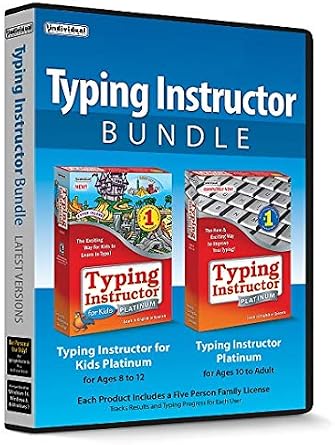
Typing Instructor Bundle - Includes Two Software Programs for Kids & Adults to Learn to Touch Type - CD/PC
90% of respondents would recommend this to a friend
Item #:
40319663
GBP 41
Price Details
Price
GBP 41
Excluding Shipping, VAT & Custom charges ( Shipping, VAT and custom charges will be calculated on checkout.
If Item price + shipping is below GBP 135, 20% VAT will be calculated on checkout, if it is equal or above GBP 135, no VAT will be charged. )
0 ratings
Write a review
In stock
 Imported from USA store
QTY:
Excluding VAT : VAT will be calculated on the checkout page
Order now and get it around Thursday, October 29
Secured transaction
Ubuy works hard to protect your security and privacy. Our advanced payment security system ensures confidentiality by encrypting your information during transmission using AES (Advanced Encryption Standards) and SSL (Secure Socket Layer) protocols. Your payment details are 100% secure as we do not share your payment details with third party sellers.
Our Top Logistics Partners


Kids can explore Typer Island! Type your own adventure!

Buy Now Pay Later

Fast
Shipping

Free
Return*

Secure Packaging

100% Original Products

PCI DSS Compliance

ISO 27001 Certified





Note: Step Down Voltage Transformer required for using electronics products of US store (110-120). Recommended power converters Buy Now.


What Stands Out
Comprehensive Learning
The Typing Instructor Bundle offers both kids and adults engaging lessons, catering to all age groups. Its dual software programs ensure a well-rounded experience for learners at different skill levels.
Interactive Interface
With an interactive, user-friendly interface, this bundle makes learning touch typing enjoyable. It incorporates games and challenges to keep users motivated and encourages consistent practice.
Flexible Accessibility
This product comes on CD/PC format, allowing for flexible access across multiple devices. Users can enhance their typing skills anytime, anywhere, making it perfect for busy schedules.
Product Details
| Package Dimensions | 7.44 x 5.35 x 0.63 inches (18.9 x 13.6 x 1.6 cm); 3.35 ounces (94.97 grams) |
| Date First Available | March 22, 2019 |
| Manufacturer | Individual Software |
Who Should Buy?

-
Kids Learning
Ideal for children who are beginners and want to develop touch typing skills in a fun and interactive way.
-
Adult Learners
Suitable for adults seeking to improve typing speed and accuracy for personal or professional growth in a comfortable environment.
-
Homeschooling Families
Great option for parents who want to integrate typing skills into their homeschooling curriculum for a well-rounded education.

-
Advanced Typists
Not suitable for experienced typists looking for advanced techniques or specialized typing training beyond basic skills.
Product Description
Typing Instructor Bundle - Includes Two Software Programs for Kids & Adults to Learn to Touch Type - CD/PC
Have any Query? Chat with us
Customer Questions & Answers
-
Question:
How to Shop Typing Instructor Bundle - Includes Two Software Online From Ubuy?
Answer: It’s easy to shop Typing Instructor Bundle - Includes Two Software online from Ubuy. You just have to search for the product, choose your shipping method while checking out and get it delivered to your location. -
Question:
Is Typing Instructor Bundle - Includes Two Software Available to Shop Online in UK?
Answer: Yes, at Ubuy UK this product is available for you to shop at a reasonable price. The Typing Instructor Bundle - Includes Two Software is not available locally but you can trust us with our express shipping services. -
Question:
How Long Does It Take to Get Product After Placing the Order?
Answer: The delivery time of your ordered product varies as per what you've ordered and the shipping method that you've chosen. The estimated delivery time is mentioned during the checkout process, so be carefree while shopping.
Individual Software Typing Editorial Review
**** The Typing Instructor Bundle offers a versatile approach to learning touch typing, catering to both children and adults through its two distinct software programs. Many users have praised the adult program, particularly the 10+ version, which effectively introduces typing skills by teaching the easiest keys first and gradually increasing difficulty. This method not only helps learners build confidence but also engages them with fun activities and games sprinkled throughout the lessons. Parents have noted that the incremental increase in words per minute needed for progression keeps the learning experience both challenging and enjoyable for their older children. Conversely, the children's program focuses more on play than rigorous learning. While younger users enjoy the gameplay elements, some parents feel it leans too heavily on entertainment rather than education, potentially diluting the effectiveness of the lessons. Nonetheless, children do appear to learn, albeit at a potentially slower rate than with the adult program. Installation of the software has generally been a smooth experience for users with Windows 10 compatibility, although there have been reports of confusion regarding compatibility with Windows 11. Some users faced challenges in locating activation keys and have received mixed responses from customer service about resolving such issues. However, positive feedback highlights the ease of adding users and the ability to remove them as they become proficient, making this product an efficient investment for families or individuals looking to enhance typing skills collectively. Overall, the Typing Instructor Bundle appears to be a solid choice for families seeking a fun and engaging way to learn typing, especially for older children and adults, while younger kids can benefit from its playful design, even if more time is spent on gaming than learning. **
Customer Reviews & Ratings
1 customers ratings
-
5 Star
100%
-
4 Star
0%
-
3 Star
0%
-
2 Star
0%
-
1 Star
0%
Review this product
Share your thoughts with other customers
Pros
- Gradual difficulty progression for the adult program.
- Engaging games reinforce learning.
- Multiple user capability allows for family use.
- Easy installation process on Windows.
Cons
- Focus on gameplay may dilute educational value in the children's program.
Platform Trust & Buyer Confidence

JK
Jasmin
Verified buyer
“Great products and very good service: very easy and very fast international delivery.”
9 September 2026 · via Trustpilot
AG
Anke
Verified buyer
“Wonderful online shopping experience, smooth transaction from the start. Payment method works conveniently and delivery is unexpectedly fast and reliable. You go the extra mile for service. What makes this even more amazing, you deliver to Namibia. I will remain a happy Ubuy customer and will increase my purchases for sure! Thank you!”
10 September 2026 · via Trustpilot
H
Hazel
Verified buyer
“Very easy to find the products what you need, and so fast delivery, that’s why I highly recommended to others costumers to used ubuy.”
10 September 2026 · via Trustpilot
O
Opaleye
Verified buyer
“I received exactly what I ordered I was skeptical about your site because that was my first time to order. But the order came timely and neatly packaged. I was not disappointed. Thank you.”
11 September 2026 · via Trustpilot
AC
Adele
Verified buyer
“Easy to find and order what you want on the website. Delivery is quick to the UK”
8 September 2026 · via Trustpilot
WHY SHOP WITH US
Secure Checkout
Global Delivery
Easy Returns
Genuine Products
Product Price History
Important information
- Limitations : For products shipped internationally, please note that any manufacturer warranty may not be valid; manufacturer service options may not be available; product manuals, instructions, and safety warnings may not be in destination country languages; the products (and accompanying materials) may not be designed in accordance with destination country standards, specifications, and labeling requirements; and the products may not conform to destination country voltage and other electrical standards (requiring use of an adapter or converter if appropriate). The recipient is responsible for assuring that the product can be lawfully imported to the destination country. When ordering from Ubuy or its affiliates, the recipient is the importer of record and must comply with all laws and regulations of the destination country.
- Not all the products listed on Ubuy are for sale, as Ubuy is a global search engine. Products are subject to export/trade regulations.
GBP 41
Excluding VAT : VAT will be calculated on the checkout page
Order now and get it around Thursday, October 29
This item is not restrict in my country.(Please click on above link if this item is not restrict in your country, So our team will review and allow.)
QTY:
Secured transaction
PCI DSS compliant and ISO 27001:2022 certified, with encrypted payments and full buyer protection on every order.
Our Top Logistics Partners
Fastest cross-border delivery
Features & Benefits
- Step-by-step lessons, challenges, tests, and games keep typists engaged.
- Available in English or Spanish with themes like World Travel, Safari, or Time Travel.
- Typing games provide fun practice and build finger-to-key memory.
- Kids and adults have multiple typing plans to choose from.
- Works on Windows 11, 10 & 8.
- Includes free technical support for installation or activation assistance.
Ubuy Assurance
Experience worry-free shopping with 100% original products, PCI DSS-compliant payment security, ISO 27001-certified data protection, the fastest cross-border delivery, free returns *, and secure packaging on every order.