- Home Page /
- Electronics /
- Computer Accessories /
- Computer Accessories & Peripherals /
- Keyboards, Mice & Accessories /
- Computer Keyboards /
- Dell Keyboard, Wireless
0 ratings

Item #:
92451600
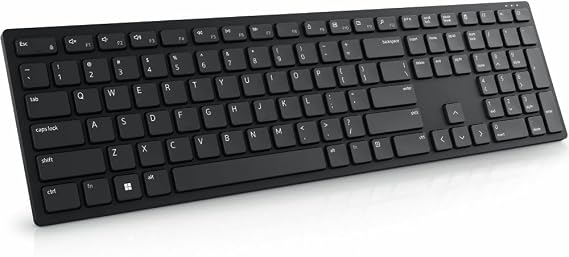
Dell Keyboard, Wireless
Item #:
92451600
GBP 38
Price Details
Price
GBP 38
Excluding Shipping, VAT & Custom charges ( Shipping, VAT and custom charges will be calculated on checkout.
If Item price + shipping is below GBP 135, 20% VAT will be calculated on checkout, if it is equal or above GBP 135, no VAT will be charged. )
0 ratings
Write a review
In stock
 Imported from USA store
QTY:
Excluding VAT : VAT will be calculated on the checkout page
Order now and get it around Friday, August 14
Secured transaction
Ubuy works hard to protect your security and privacy. Our advanced payment security system ensures confidentiality by encrypting your information during transmission using AES (Advanced Encryption Standards) and SSL (Secure Socket Layer) protocols. Your payment details are 100% secure as we do not share your payment details with third party sellers.
Our Top Logistics Partners


Experience maximum efficiency with the plunger key switch technology for comfortable and silent typing.

Buy Now Pay Later

Fast
Shipping

Free
Return*

Secure Packaging

100% Original Products

PCI DSS Compliance

ISO 27001 Certified


Note: Step Down Voltage Transformer required for using electronics products of US store (110-120). Recommended power converters Buy Now.


What Stands Out
Ergonomic Design
The Dell Keyboard features an ergonomic layout that promotes comfortable typing, reducing hand fatigue and enhancing productivity for users during extended use.
Durable Build
Crafted with high-quality materials, this keyboard is designed to withstand daily wear and tear, ensuring longevity and reliability for both home and office environments.
Multimedia Controls
Equipped with dedicated multimedia keys, the Dell Keyboard provides quick access to audio functions, enhancing user experience for entertainment or work without disrupting workflow.
Product Details
| Compatible Devices | PC |
| Connectivity Technology | Wireless |
| Additional Features | Plunger, Wireless |
| Power Source | Battery Powered |
| Switch Type | Tactile |
| Keyboard Layout | QWERTY |
| Hand Orientation | Ambidextrous |
| Button Quantity | 104 |
| Mechanical Keyboard Switch Model | Plunger |
| Minimum Required Operating System Version | Windows 10 |
| Compatible Operating System Family | Windows |
| Number of Keys | 104 |
| Color | Information Not Available |
| Item Dimensions L x W x H | 4.8"L x 17"W x 1.3"H (12.2 x 43.2 x 3.3 cm) |
| Enclosure Material | Plastic |
| Brand | Dell |
| Keyboard Description | Wireless |
| Antenna Location | Everyday Use |
| Built-In Media | USB Cable |
| Model Number | KB500-BK-R-US |
| Model Name | Keyboard |
| Unit Count | 1.0 Count |
| Manufacturer | Dell Technologies |
| UPC | 884116435211 |
| Mfr Part Number | KB500-BK-R-US |
| Item Weight | 1.42 Pounds (640 grams) |
| Recommended Uses For Product | Everyday Use |
| Special Feature | Plunger, Wireless |
| Product Dimensions (L x W x H) | 4.8"L x 17"W x 1.3"H (12.2 x 43.2 x 3.3 cm) |
| Material | Plastic |
| Included Components | USB Cable |
Who Should Buy?

-
Office Workers
Ideal for office environments, offering reliability and comfort during long typing sessions with minimal noise.
-
Gamers
Suitable for gamers seeking a responsive and durable keyboard, providing fast typing for competitive gameplay.
-
Students
Great for students needing an affordable yet functional keyboard for writing papers and research projects.

-
Writers
Professional writers may prefer mechanical keyboards for better tactile feedback and improved typing experience.
Product Description
Dell Keyboard, Wireless
Have any Query? Chat with us
Customer Questions & Answers
-
Question:
What types of Dell keyboards are available?
Answer: Dell offers a variety of keyboard types, including wired, wireless, mechanical, and membrane options. Each type caters to specific user preferences and needs, such as typing experience or portability. For instance, mechanical keyboards may appeal to gamers due to their tactile feedback and durability, while wireless models are convenient for users seeking a clutter-free workspace. Understanding your primary usage—office work, gaming, or casual browsing—will help you choose the right keyboard. -
Question:
Are Dell keyboards compatible with different operating systems?
Answer: Yes, Dell keyboards are generally compatible with various operating systems, including Windows, macOS, and Linux. This flexibility is crucial for users who may switch between devices or work in diverse environments. Make sure to check the specifications of the specific model you are considering, as some key functionalities may vary depending on the OS. This ensures that you can enjoy all features seamlessly regardless of your operating system. -
Question:
What are the benefits of using a Dell mechanical keyboard?
Answer: Dell mechanical keyboards provide an enhanced typing experience characterized by tactile response and durability. They are particularly beneficial for gamers and heavy typists who demand precision and speed. The key switches used in mechanical keyboards typically last longer than those in membrane keyboards, ensuring longevity. If you spend considerable time typing or gaming, a mechanical keyboard from Dell can significantly improve your productivity and overall comfort. -
Question:
How do I connect a Dell wireless keyboard?
Answer: To connect a Dell wireless keyboard, you generally need to insert the USB dongle into an available port on your computer. Once connected, turn on the keyboard, and it should automatically pair with your device. Some models may require installing drivers or software for additional features. For seamless usage, ensure that the battery is charged and within range, allowing for a stable connection during your work or play sessions. -
Question:
Can I customize the keys on my Dell keyboard?
Answer: Yes, some Dell keyboards offer customization options, allowing you to change key assignments or add macros through software provided by Dell. This is especially useful for gamers or professionals who require specific shortcuts for enhanced efficiency. Customization can improve your workflow by streamlining actions, ultimately making it easier to access frequently used applications or commands with a simple keystroke. -
Question:
Do Dell keyboards have backlighting features?
Answer: Many Dell keyboard models come equipped with backlighting features, enhancing visibility in low-light environments. This feature is beneficial for night-time typists, gamers, or anyone working in dimly lit areas. Adjustable brightness levels may also be available, allowing you to customize the lighting to your preference. Backlit keyboards can add an aesthetic touch to your setup while improving ergonomics during extended use. -
Question:
Can I use a Dell keyboard with my tablet or smartphone?
Answer: Yes, you can connect many Dell keyboards to tablets or smartphones via Bluetooth, provided that your mobile device supports Bluetooth connectivity. This can enhance your typing experience compared to using an on-screen keyboard, making it more comfortable for writing emails or documents. Always check the compatibility of both your keyboard and device to ensure a successful connection for your mobile needs. -
Question:
How do I clean my Dell keyboard?
Answer: Cleaning your Dell keyboard is straightforward and essential for maintaining functionality. Start by disconnecting it from power or removing the batteries. Use compressed air to blow out dust and debris from between the keys. For a deeper clean, dampen a cloth with isopropyl alcohol and gently wipe the keys and surface. This not only improves hygiene but can also keep your keyboard functioning smoothly, especially in high-use scenarios. -
Question:
What is the difference between membrane and mechanical keyboards?
Answer: Membrane keyboards use a pressure pad system beneath the keys, while mechanical keyboards utilize individual mechanical switches. The main difference lies in the typing experience; mechanical keyboards provide tactile feedback and a more satisfying feel, which is preferred by gamers and typists. Membrane keyboards tend to be quieter and more compact, making them suitable for office environments. Choose based on your preferences for typing feel and sound. -
Question:
Where can I buy Dell Keyboard in UK?
Answer: You can purchase a Dell Keyboard in UK directly from Ubuy. They offer a range of models and styles, ensuring you find the one that fits your needs. Ubuy provides a user-friendly shopping experience with detailed product descriptions to help you make informed choices.
Dell Keyboards KB500-BK-R-US Editorial Review
No editorial reviews found
Customer Reviews & Ratings
1 customers ratings
-
5 Star
100%
-
4 Star
0%
-
3 Star
0%
-
2 Star
0%
-
1 Star
0%
Review this product
Share your thoughts with other customers
Platform Trust & Buyer Confidence

MT
Mohd
Verified buyer
“The product received very good packaging & safe…Thank You”
16 June 2026 · via Trustpilot
SJ
Shawati
Verified buyer
“Accurate delivery timing given”
16 June 2026 · via Trustpilot
YB
Youcef
Verified buyer
“Not madly expensive like I thought, and much quicker than promised.”
15 June 2026 · via Trustpilot
LM
Leila
Verified buyer
“Never dealt with Ubuy before, but everything worked out great. Seamless cross border purchasing and shipping. Thanks!”
6/7/2026 · via Trustpilot
KA
Kwame
Verified buyer
“The process was smooth, with clear communication and timelines. This was my 1st purchase and I am really impressed. I will definitely be coming back.”
12 June 2026 · via Trustpilot
Secure Checkout
Global Delivery
Easy Returns
Genuine Products
Product Price History
Important information
- Limitations : For products shipped internationally, please note that any manufacturer warranty may not be valid; manufacturer service options may not be available; product manuals, instructions, and safety warnings may not be in destination country languages; the products (and accompanying materials) may not be designed in accordance with destination country standards, specifications, and labeling requirements; and the products may not conform to destination country voltage and other electrical standards (requiring use of an adapter or converter if appropriate). The recipient is responsible for assuring that the product can be lawfully imported to the destination country. When ordering from Ubuy or its affiliates, the recipient is the importer of record and must comply with all laws and regulations of the destination country.
- Not all the products listed on Ubuy are for sale, as Ubuy is a global search engine. Products are subject to export/trade regulations.
GBP 38
Excluding VAT : VAT will be calculated on the checkout page
Order now and get it around Friday, August 14
This item is not restrict in my country.(Please click on above link if this item is not restrict in your country, So our team will review and allow.)
QTY:
Secured transaction
PCI DSS compliant and ISO 27001:2022 certified, with encrypted payments and full buyer protection on every order.
Our Top Logistics Partners
Fastest cross-border delivery
Features & Benefits
- Wireless connectivity for a clutter-free workspace.
- Plunger key switch technology for fast data entry.
- Comfortable and silent typing experience.
- Durable and cost-effective design.
- Guaranteed better lifespan for long-lasting use.
- Ideal for both home and office settings.
Ubuy Assurance
Experience worry-free shopping with 100% original products, PCI DSS-compliant payment security, ISO 27001-certified data protection, the fastest cross-border delivery, free returns *, and secure packaging on every order.