0 ratings




Item #:
94579849
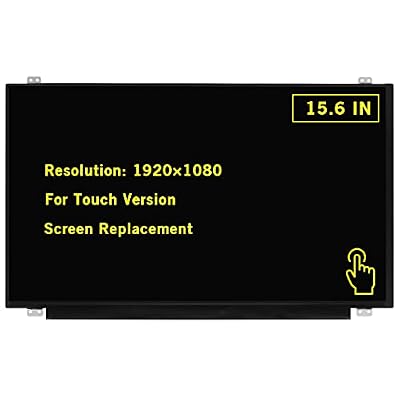
15.6" New Screen Replacement for Dell Inspiron 3593 Full-HD 1920x1080 40Pin Touch Screen LED LCD Display Panel
Item #:
94579849
GBP 83
Price Details
Price
GBP 83
Excluding Shipping, VAT & Custom charges ( Shipping, VAT and custom charges will be calculated on checkout.
If Item price + shipping is below GBP 135, 20% VAT will be calculated on checkout, if it is equal or above GBP 135, no VAT will be charged. )
0 ratings
Write a review
In stock
 Imported from USA store
QTY:
Only 6 items left in stock.
Excluding VAT : VAT will be calculated on the checkout page
Order now and get it around Wednesday, June 24
Secured transaction
Ubuy works hard to protect your security and privacy. Our advanced payment security system ensures confidentiality by encrypting your information during transmission using AES (Advanced Encryption Standards) and SSL (Secure Socket Layer) protocols. Your payment details are 100% secure as we do not share your payment details with third party sellers.
Our Top Logistics Partners


Please install it Very Professionally, if Not, Please Do Not Try.

Buy Now Pay Later

Fast
Shipping

Free
Return*

Secure Packaging

100% Original Products

PCI DSS Compliance

ISO 27001 Certified


Note: Step Down Voltage Transformer required for using electronics products of US store (110-120). Recommended power converters Buy Now.


What Stands Out
Complete Assembly
The GBOLE screen replacement comes as a full assembly, ensuring easy installation and a hassle-free experience for users looking to quickly restore their MacBook Pro functionality.
High Resolution
With a stunning 2560x1600 resolution, this Retina LCD display enhances visual clarity and detail, making it ideal for creators, designers, and professionals who demand superior screen quality.
Compatibility
Specifically designed for MacBook Pro models A1706 and A1708 from late 2016 to mid-2017, this replacement guarantees a perfect fit, ensuring seamless integration and performance without compatibility issues.
Product Details
- ✔️ Compatible Model: for Dell Inspiron 3593 or compatible; Size: 15.6 inches.
- ✔️ Note: When opening the package, please confirm that the package is complete, this product is fragile, please operate carefully to avoid damage.
- ✔️ Package includes LCD screen ONLY, no other parts. Please keep your original parts and turn off the power before assembly.
- 📧 It will be tested and packed carefully before shipping. Before purchasing, please reconfirm whether the product you choose is the model you need, if you have any doubts, please contact us in time.
| Package Dimensions | 16.06 x 11.34 x 2.09 inches (40.8 x 28.8 x 5.3 cm) |
| Item Weight | 2.33 pounds (1.06 kg) |
| Manufacturer | GBOLE |
| Date First Available | February 9, 2023 |
Who Should Buy?

-
DIY Enthusiasts
Ideal for users comfortable with repairing their devices, saving on repair costs while gaining hands-on experience.
-
Budget-Conscious Users
Users seeking to replace a damaged screen without paying for expensive professional repairs can find this product economical.
-
Students & Professionals
Perfect for students and professionals needing a reliable display for study or work, significantly extending the laptop's lifespan.

-
Inexperienced Users
Not suitable for those without technical skills, as installation may be difficult and risk causing further damage.
-
Older MacBook Models
Users with MacBook models outside of the specified EMC numbers may find this screen incompatible with their devices.
-
Non-Mac Users
Users who do not own a MacBook Pro compatible with this screen replacement should seek other alternatives.
Product Description
Have any Query? Chat with us
Customer Questions & Answers
-
Question:
What specifications should I consider when replacing my Dell Inspiron 3593 screen?
Answer: When replacing your Dell Inspiron 3593 screen, ensure that the specifications match exactly, including the size, resolution (1920x1080), and the connector type (40Pin). This guarantees compatibility with your laptop, ensuring optimal performance. Additionally, consider whether you need a touch screen feature, as this affects your user experience. Scenarios where these specifications matter include multitasking in a professional environment or enjoying high-definition media content. -
Question:
Is the installation process for the Dell Inspiron 3593 screen replacement complicated?
Answer: The installation of a new screen for the Dell Inspiron 3593 can be complex, depending on your technical skills. It typically involves removing the laptop bezel, unscrewing the old screen, and connecting the new one carefully. Many choose to follow online tutorials for guidance. This is especially important for users who might be upgrading to a better display for gaming or graphic design, where precision and careful installation can greatly impact performance. -
Question:
Can I use a screen from another model for my Dell Inspiron 3593?
Answer: While some screens may look similar, it's crucial to use a screen specifically designed for the Dell Inspiron 3593 to ensure compatibility. Differences in connectors, resolutions, or physical dimensions can prevent the screen from functioning correctly. Using the right model helps avoid issues such as flickering or display failure, making it essential for anyone relying on their laptop for everyday tasks or high-performance applications. -
Question:
What tools do I need to replace the screen on my Dell Inspiron 3593?
Answer: To replace the screen on your Dell Inspiron 3593, you'll typically need a small Phillips screwdriver, a plastic opening tool, and an anti-static wrist strap to prevent electrical damage. These tools will assist you in safely opening the device and handling components. This knowledge is particularly useful for DIY enthusiasts aiming to save on repair costs while ensuring they maintain functionality in scenarios like intense gaming sessions or professional presentations. -
Question:
Are there any common issues I should be aware of with the Dell Inspiron 3593 screen?
Answer: Common issues with the Dell Inspiron 3593 screen include dead pixels, screen flickering, and touch sensitivity problems, especially if the screen has been damaged due to impact or wear. Being aware of these issues can help you identify when a replacement is necessary, improving your overall computing experience. Users often notice these problems during intensive use, such as video editing or gaming, where a responsive and clear display is essential. -
Question:
Does the touch screen feature affect screen replacement choices?
Answer: Yes, when replacing your Dell Inspiron 3593 display, ensure you choose a screen that incorporates touch screen technology if your original model featured it. This affects not just usability but also overall performance. Not having the correct touchscreen capability can lead to limit interactions and productivity, especially for professionals who rely on touch functions for design software or other interactive applications. -
Question:
What is the difference between LED and LCD screens for laptops like the Dell Inspiron 3593?
Answer: LED screens are actually a type of LCD that uses LED backlighting, which provides better brightness and color accuracy compared to traditional LCDs. For your Dell Inspiron 3593, choosing LED ensures a brighter and more vibrant display, enhancing your audio-visual experience. This difference is particularly significant when consuming multimedia content, as well as for graphic design tasks that require accurate color representation. -
Question:
How can I determine if my Dell Inspiron 3593 screen needs replacement?
Answer: If you notice persistent issues like cracks, discoloration, or unresponsive areas on your screen, it’s likely time for a replacement. Additionally, if the display is flickering or not displaying at all, these are strong indicators of failure. Identifying these issues early can help maintain productivity, particularly for users engaged in work or studies that rely heavily on visual performance. -
Question:
Where can I buy a 15.6" New Screen Replacement for Dell Inspiron 3593 in UK?
Answer: You can purchase a 15.6" New Screen Replacement for the Dell Inspiron 3593 from Ubuy in UK. Ubuy offers a range of high-quality replacement screens, ensuring reliable options that match the specifications of your laptop. This is particularly convenient for users seeking trusted sources for essential laptop components, allowing for efficient repairs and upgrades. -
Question:
What factors influence the quality of the replacement screen for my Dell Inspiron 3593?
Answer: Several factors affect the quality of a replacement screen, including the manufacturer, screen type (such as IPS vs. TN), and overall build quality. Genuine parts or high-quality third-party options typically offer enhanced durability and performance. Understanding these factors is essential for users who prioritize display quality for tasks like gaming, visual editing, or regular usage where clarity and responsiveness are paramount.
GBOLE Replacement Screens Editorial Review
No editorial reviews found
Customer Reviews & Ratings
7 customers ratings
-
5 Star
58%
-
4 Star
0%
-
3 Star
0%
-
2 Star
0%
-
1 Star
42%
Review this product
Share your thoughts with other customers
Pros
- Bright and clear display
- Easy to install
- Full HD resolution
- Responsive touch feature
- Good color accuracy
Cons
- Some users report compatibility issues.
Product Price History
Important information
- Limitations : For products shipped internationally, please note that any manufacturer warranty may not be valid; manufacturer service options may not be available; product manuals, instructions, and safety warnings may not be in destination country languages; the products (and accompanying materials) may not be designed in accordance with destination country standards, specifications, and labeling requirements; and the products may not conform to destination country voltage and other electrical standards (requiring use of an adapter or converter if appropriate). The recipient is responsible for assuring that the product can be lawfully imported to the destination country. When ordering from Ubuy or its affiliates, the recipient is the importer of record and must comply with all laws and regulations of the destination country.
- Not all the products listed on Ubuy are for sale, as Ubuy is a global search engine. Products are subject to export/trade regulations.
GBP 83
Excluding VAT : VAT will be calculated on the checkout page
Order now and get it around Wednesday, June 24
This item is not restrict in my country.(Please click on above link if this item is not restrict in your country, So our team will review and allow.)
QTY:
Only 6 items left in stock.
Secured transaction
Ubuy works hard to protect your security and privacy. Our advanced payment security system ensures confidentiality by encrypting your information during transmission using AES (Advanced Encryption Standards) and SSL (Secure Socket Layer) protocols. Your payment details are 100% secure as we do not share your payment details with third party sellers.
Our Top Logistics Partners
Fastest cross-border delivery
Features & Benefits
- Designed specifically for Dell Inspiron 3593.
- Features a high-resolution 1920x1080 LED LCD screen.
- 15.6 inches size for optimal viewing.
- Professional installation required for best results.
- Includes a 3-month warranty for peace of mind.
- Carefully tested and securely packaged before shipping.