0 ratings

Item #:
87433804
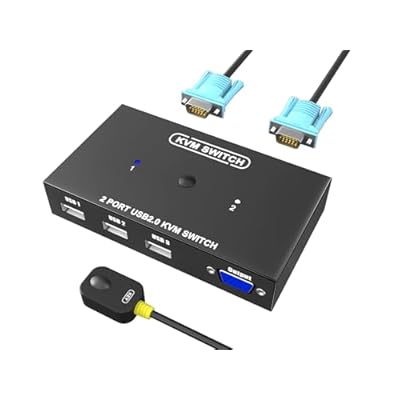
KVM Switch VGA 2 Port - VGA KVM Switch for 2 Computers Share 1 Monitor & 3 USB 2.0 Devices,Keyboard Mouse Scanner Printer,U Disk, Driver-Free for All
Item #:
87433804
GBP 21
Price Details
Price
GBP 21
Excluding Shipping, VAT & Custom charges ( Shipping, VAT and custom charges will be calculated on checkout.
If Item price + shipping is below GBP 135, 20% VAT will be calculated on checkout, if it is equal or above GBP 135, no VAT will be charged. )
0 ratings
Write a review
In stock
 Imported from USA store
QTY:
Excluding VAT : VAT will be calculated on the checkout page
Order now and get it around Thursday, June 25
Secured transaction
Ubuy works hard to protect your security and privacy. Our advanced payment security system ensures confidentiality by encrypting your information during transmission using AES (Advanced Encryption Standards) and SSL (Secure Socket Layer) protocols. Your payment details are 100% secure as we do not share your payment details with third party sellers.
Our Top Logistics Partners


Easily switch between 2 computers sharing 1 USB device with our USB 2.0 Peripheral Switcher - perfect for clean desktops and seamless operation.

Buy Now Pay Later

Fast
Shipping

Free
Return*

Secure Packaging

100% Original Products

PCI DSS Compliance

ISO 27001 Certified


Note: Step Down Voltage Transformer required for using electronics products of US store (110-120). Recommended power converters Buy Now.


What Stands Out
Dual Computer Connection
Easily control two computers using one monitor and peripherals, increasing workspace efficiency and eliminating clutter from multiple screens.
USB Device Sharing
Connect and switch between three USB devices effortlessly, allowing seamless operation of keyboard, mouse, and other peripherals without additional software installation.
Driver-Free Operation
Compatible with all operating systems, this KVM switch offers hassle-free plug-and-play functionality, ensuring that users can set up quickly and easily without technical knowledge.
Product Details
| Item Weight | 3 lbs (1.36 kg) |
Who Should Buy?

-
Small Offices
Ideal for small office setups, allowing multiple computers to share one monitor and peripherals efficiently.
-
Home Users
Perfect for home users wanting to switch between personal and work computers without cluttering workspace.
-
Tech Enthusiasts
Great for tech enthusiasts managing multiple systems simultaneously, enabling easy control through a single set of devices.

-
Gaming Setup
Not suitable for serious gamers needing high refresh rates and low latency, as it may introduce input lag.
-
4K Monitors
Incompatible with 4K displays since this KVM switch supports only VGA, limiting resolution and display quality.
-
Large Workstations
Unsuitable for large-scale workstations requiring more than two computers and numerous peripheral connections.
Product Description
KVM Switch VGA 2 Port - VGA KVM Switch for 2 Computers Share 1 Monitor & 3 USB 2.0 Devices,Keyboard Mouse Scanner Printer,U Disk, Driver-Free for All OS,2 KVM Cables 1 Desktop Controller Included
Have any Query? Chat with us
Customer Questions & Answers
-
Question:
What is a KVM switch and how does it work?
Answer: A KVM switch (Keyboard, Video, Mouse) enables you to control multiple computers using a single keyboard, monitor, and mouse setup. By switching between connected devices with a remote or button, users save on desk space and enhance productivity. The KVM Switch HDMI 8 Port allows seamless transitions among eight computers, making it ideal for multitasking or for environments with limited workspace. This type of setup is particularly beneficial for IT professionals managing multiple servers or for gamers who want to switch between gaming rigs seamlessly. -
Question:
Can I use this KVM switch with any operating system?
Answer: Yes, the KVM Switch HDMI 8 Port is designed to be compatible with various operating systems including Windows, macOS, and Linux. It doesn't require specific drivers since it operates at the hardware level, ensuring widespread usability. This feature makes it suitable for mixed-environment setups where different operating systems are used, providing flexibility for both personal and professional use. -
Question:
Does the KVM switch support audio output?
Answer: The HDMI KVM Switch primarily focuses on video and USB peripheral switching. While audio support is not a standard feature in many models, some HDMI switches may transmit audio alongside video signals. For users relying on integrated audio capabilities, selecting a model or configuration that specifies audio support is recommended. This is particularly useful for those who need sound output while managing multimedia tasks across different computers. -
Question:
What peripherals can I connect to the KVM switch?
Answer: The KVM Switch HDMI 8 Port allows connection for various peripherals including keyboards, mice, printers, and USB flash drives. This flexibility enables users to share multiple devices among up to eight computers, streamlining workflow in environments like offices or labs where multiple systems are accessed frequently. Whether you're a graphic designer needing to quickly switch between design platforms or a business professional managing client presentations, this capability enhances efficiency. -
Question:
How do you switch between computers with the KVM switch?
Answer: Switching between computers with the KVM switch can be achieved either through a remote control or by pressing a button on the unit. The remote function offers convenience, especially when the switch is placed out of reach or in a rack system. This feature is particularly advantageous in settings like server rooms or workstations where quick access to multiple systems is essential. -
Question:
What video resolutions does the KVM switch support?
Answer: The KVM Switch HDMI 8 Port typically supports high-definition resolutions, often up to 4K at 60Hz. This capability ensures crisp visuals whether you're engaging in video editing, gaming, or high-resolution multimedia work. For users needing premium video quality for graphics-intensive applications, this feature provides a blend of performance and clarity. -
Question:
Is it possible to daisy-chain multiple KVM switches?
Answer: Yes, you can daisy-chain KVM switches to expand your system even further, allowing you to connect more than eight computers if needed. This setup is useful in large network environments or studios where multiple devices must be managed simultaneously. By cascading switches, you maintain a streamlined and centralized control system, which is critical in professional settings. -
Question:
Does the KVM switch require any special setup or configurations?
Answer: The KVM Switch HDMI 8 Port is generally plug-and-play, meaning you can connect your computers and peripherals without complicated setup processes. However, depending on your specific use case, you might want to adjust some settings in your operating systems to optimize performance. This feature makes it especially useful for users who may not be technically inclined, providing a straightforward way to manage multiple devices. -
Question:
Can I share a single monitor and keyboard with multiple computers?
Answer: Absolutely! The KVM Switch HDMI 8 Port allows one monitor, keyboard, and mouse setup to be shared across eight different computers. This capability is ideal for users who want to maximize their space or avoid clutter by eliminating extra peripherals. It is commonly used in workplaces, home offices, or by tech enthusiasts who wish to simplify their workspace without sacrificing functionality. -
Question:
Where can I buy the KVM Switch HDMI 8 Port?
Answer: You can purchase the KVM Switch HDMI 8 Port from Ubuy, which offers a wide selection of electronics. Ubuy provides efficient access to various technological products, making it easier for customers in UK to find and acquire the KVM switch that best suits their needs. With Ubuy, you can explore different purchasing options and have a straightforward shopping experience.
KAGO KVM Switches Editorial Review
The customer experiences with the VGA KVM Switch for 4 Computers (model B09TYHP1K7) present a mixed yet ultimately positive reception of the product. Users commend the easy setup process, noting that once plugged in, the device works well for switching between multiple computers seamlessly. The ability to switch via a remote is also praised as a convenient feature that enhances usability in a multi-device environment, particularly alongside ergonomic setups like a mouse. However, attendees also shared their frustrations, particularly with the device's power limitations and switching capabilities. Many reported that the switch had difficulty maintaining power for all connected USB devices, occasionally causing keyboards and mice to stop working unless multiple USB ports were used or certain configurations were adjusted. Moreover, the indicator light for input switching was frequently described as unreliable, leading to confusion about which device was actively connected. While those with technical expertise expressed disappointment over the malfunctioning USB operations during their testing, many non-technical users found the switch meets their basic needs well. There were concerns about the reliability of the button used for switching, with issues noted about rapid toggling leading to unintended input changes. In summary, the KVM switch is an economical choice for those who need a lightweight and easy-to-install solution for managing multiple computers. However, potential buyers should be aware of its limitations regarding power draw and switching reliability. **
Customer Reviews & Ratings
1 customers ratings
-
5 Star
0%
-
4 Star
100%
-
3 Star
0%
-
2 Star
0%
-
1 Star
0%
Review this product
Share your thoughts with other customers
Pros
- Easy setup with plug-and-play functionality
- Compact and lightweight design
- Convenient remote switch feature
- Works well for managing multiple computers (laptops & desktops)
Cons
- Unreliable indicator light for input selection
Product Price History
Important information
- Limitations : For products shipped internationally, please note that any manufacturer warranty may not be valid; manufacturer service options may not be available; product manuals, instructions, and safety warnings may not be in destination country languages; the products (and accompanying materials) may not be designed in accordance with destination country standards, specifications, and labeling requirements; and the products may not conform to destination country voltage and other electrical standards (requiring use of an adapter or converter if appropriate). The recipient is responsible for assuring that the product can be lawfully imported to the destination country. When ordering from Ubuy or its affiliates, the recipient is the importer of record and must comply with all laws and regulations of the destination country.
- Not all the products listed on Ubuy are for sale, as Ubuy is a global search engine. Products are subject to export/trade regulations.
GBP 21
Excluding VAT : VAT will be calculated on the checkout page
Order now and get it around Thursday, June 25
This item is not restrict in my country.(Please click on above link if this item is not restrict in your country, So our team will review and allow.)
QTY:
Secured transaction
Ubuy works hard to protect your security and privacy. Our advanced payment security system ensures confidentiality by encrypting your information during transmission using AES (Advanced Encryption Standards) and SSL (Secure Socket Layer) protocols. Your payment details are 100% secure as we do not share your payment details with third party sellers.
Our Top Logistics Partners
Fastest cross-border delivery
Features & Benefits
- Share one USB device between two computers effortlessly.
- USB 2.0 compatibility with a transfer rate of 480Mbps.
- Includes two 1.5-meter USB cables and a desktop controller.
- Plug and play functionality — no drivers needed.
- Ideal for various settings: offices, presentations, and home use.
- Compact size for a clutter-free workspace.