- Home Page /
- Office Products /
- Office Electronics /
- Printers & Accessories /
- Computer Printer Parts & Accessories /
- Computer Printer Ink & Toner /
- Inkjet Ink Cartridges /
- Best Printers L3110 Maintenance Box Replaceme...
0 ratings


Item #:
96307139
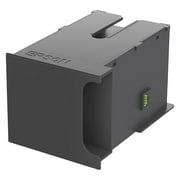
Best Printers L3110 Maintenance Box Replacement Waste Ink Pad for EPSON ET-2720 ET-2803 ET-2800 ET-2711 ET-4700, L3110, L3210, L3150, L3250
89% of respondents would recommend this to a friend
Item #:
96307139
GBP 17
Price Details
Price
GBP 17
Excluding Shipping, VAT & Custom charges ( Shipping, VAT and custom charges will be calculated on checkout.
If Item price + shipping is below GBP 135, 20% VAT will be calculated on checkout, if it is equal or above GBP 135, no VAT will be charged. )
11%
In stock
 Imported from USA store
QTY:
Excluding VAT : VAT will be calculated on the checkout page
Order now and get it around Sunday, September 13
Secured transaction
Ubuy works hard to protect your security and privacy. Our advanced payment security system ensures confidentiality by encrypting your information during transmission using AES (Advanced Encryption Standards) and SSL (Secure Socket Layer) protocols. Your payment details are 100% secure as we do not share your payment details with third party sellers.
Our Top Logistics Partners


A waste ink pad replacement is essential for maintaining your printer's performance.

Buy Now Pay Later

Fast
Shipping

Free
Return*

Secure Packaging

100% Original Products

PCI DSS Compliance

ISO 27001 Certified





Note: Step Down Voltage Transformer required for using electronics products of US store (110-120). Recommended power converters Buy Now.


What Stands Out
Compatibility
Designed specifically for various EPSON EcoTank models, ensuring perfect fit and functionality, which reduces maintenance issues and enhances printer longevity.
Easy Installation
User-friendly design allows for quick and straightforward installation, enabling users to replace the waste ink pad without the need for professional assistance.
Cost-Effective
Affordable alternative to OEM parts, offering excellent value while maintaining high-quality performance to efficiently manage waste ink and maintain printer efficiency.
Product Details
| Page Yield | 10000 |
| Compatible Devices | Epson ET 2800, Epson ET-2711, Epson ET-2720, Epson ET-4700, Printer |
| Other Special Features of the Product | Long-Lasting |
| Compatibility Options | Compatible |
| Color | White |
| Compatible Printer Models | Epson ET 2800, Epson ET-2711, Epson ET-2720, Epson ET-2803, Epson ET-4700 |
| Cartridge Type | Compatible |
| Printer Model Compatibility | Epson ET(EcoTank) ET-2711, Epson ET(EcoTank) ET-2720, Epson ET(EcoTank) ET-2800, Epson ET(EcoTank) ET-2803, Epson ET(EcoTank) ET-4700 |
| Ink Base | Water |
| Additional Printer Functions | Print Only |
| Item Dimensions D x W x H | 0.79"D x 0.98"W x 1.18"H (2 x 2.5 x 3 cm) |
| Print media | Paper (plain) |
| Printer Output Type | multiple colors |
| Printer Type | Inkjet |
| Model Name | EPL31 |
| Brand | Best Printers |
| Manufacturer | Zhuhai Enlite |
| Number of Items | 1 |
| Unit Count | 1 Count |
| UPC | 309780988899 |
| Number of Packs | 1 |
| Built-In Media | waste ink pad (with sponge), seal bag x 1, disposable gloves x 1 |
| Model Number | L3110 |
| Model Series | Epson L31 |
| Mfr Part Number | 101 |
| Special Feature | Long-Lasting |
| Country of Origin | This item will be imported from US |
What's in the box
waste ink pad (with sponge), seal bag x 1, disposable gloves x 1
Who Should Buy?

-
Frequent Epson Users
Ideal for users with high print volumes needing regular waste ink pad replacements for uninterrupted printing.
-
Home Offices
Perfect for home office setups where consistent printing is required along with maintenance to prevent issues.
-
DIY Enthusiasts
Great for individuals comfortable with printer maintenance who prefer replacing components instead of replacing printers.

-
Casual Printers
Not suitable for infrequent users who rarely print and may not need regular maintenance replacements.
Product Description
Have any Query? Chat with us
Related Searches
Customer Questions & Answers
-
Question:
What is a Maintenance Box Replacement Waste Ink Pad for Epson printers?
Answer: The Maintenance Box Replacement Waste Ink Pad is a component designed to collect excess ink during printer cleaning and maintenance cycles. In Epson ET-2720, ET-2803, ET-2800, ET-2711, and ET-4700 models, this pad plays a crucial role in preventing ink overflow and ensuring the printer functions efficiently. When this component fills up, it can lead to ink leakage or printer errors. Regular replacement ensures optimal performance, reduces downtime, and maintains print quality. -
Question:
How do I know when to replace the waste ink pad in my Epson printer?
Answer: Indicators that your Epson printer requires a waste ink pad replacement include error messages on the display panel or a decline in print quality due to ink build-up. Additionally, a blinking status light may signal maintenance needs. To check if the waste ink pad is saturated, you can review printer settings or use Epson’s utility software to inspect the waste tank status. Timely replacement not only extends the printer's lifespan but also maintains consistent print results. -
Question:
Can I replace the waste ink pad myself?
Answer: Yes, replacing the waste ink pad can be done by users comfortable with basic printer maintenance. The process generally involves turning off the printer, opening the printer cover, and locating the waste ink pad compartment. It's essential to follow your specific printer model's manual for precise instructions. Proper installation ensures that the new pad correctly collects excess ink, preventing further issues. This DIY approach saves costs and enhances your printer's reliability. -
Question:
Where can I find a suitable replacement for the Epson waste ink pad?
Answer: You can find compatible waste ink pads for Epson printers at various online retailers, including specialized printer parts stores. It's crucial to ensure that the replacement part matches your printer model's specifications. Researching user reviews will guide you in selecting a reliable product, thus ensuring your printer's uninterrupted service. Proper sourcing can significantly impact the longevity and performance of your printer. -
Question:
How do I dispose of the old waste ink pad responsibly?
Answer: Disposing of the old waste ink pad should be done in compliance with local regulations regarding electronic waste and ink disposal. Many communities have specific sites for recycling printer parts. It's advisable to seal the used pad in a plastic bag to prevent leakage. Responsible disposal not only helps the environment but also encourages sustainable practices in technology use. Always check local guidelines for the best disposal methods. -
Question:
What issues can arise from not replacing the waste ink pad in my Epson printer?
Answer: Failure to replace the waste ink pad can lead to several issues, including ink overflow, printer malfunctions, and even permanent damage to the printer's internal components. When the pad is saturated, it can cause ink to leak onto the internal parts or surfaces. This can result in print quality degradation and errors that hinder operation. Regular maintenance, including timely waste pad replacement, ensures a smoother printing experience and avoids unexpected repairs. -
Question:
Is there a specific procedure for resetting my printer after replacing the waste ink pad?
Answer: Yes, after replacing the waste ink pad, it's necessary to reset the ink pad counter to inform the printer that the component has been changed. This typically involves accessing the printer’s maintenance settings through its software or using a specific reset tool recommended by Epson. Failing to reset the counter can result in continued error messages and printer blocks. Properly resetting ensures your printer operates smoothly and efficiently after maintenance. -
Question:
Are there any aftermarket alternatives for the Epson waste ink pads?
Answer: Yes, there are aftermarket alternatives available for the Epson waste ink pads. While original equipment manufacturer (OEM) parts offer reliable quality, some aftermarket options may provide a more economical choice without sacrificing performance. However, it's essential to ensure these alternatives are compatible with your specific models, such as the ET-2720 or ET-2800. Researching reviews and product reliability can help you find a trustworthy option that meets your needs. -
Question:
Can I clean and reuse my waste ink pad instead of replacing it?
Answer: Cleaning and reusing a waste ink pad is generally not recommended, as these pads are designed for one-time use and become saturated with ink over time. If a pad is cleaned, it may not effectively absorb excess ink in the future. Additionally, improper cleaning can introduce contaminants that could affect print quality. For optimal printer performance, it’s best to replace the pad regularly with a new one designed for your specific Epson model. -
Question:
Where can I buy Maintenance Box Replacement Waste Ink Pad for Epson ET-2720, ET-2803, ET-2800, ET-2711, ET-4700?
Answer: You can buy the Maintenance Box Replacement Waste Ink Pad for Epson ET-2720, ET-2803, ET-2800, ET-2711, ET-4700 at Ubuy. This platform offers a range of genuine and compatible printer parts, ensuring you receive high-quality replacements quickly. Ubuy is known for its extensive inventory and reliable service, making it a great choice for maintaining your Epson printer's performance. Browse their website for the best options available in UK.
Best Printers Inkjet Ink Cartridges L3110 Editorial Review
Best Printers L3110 Maintenance Box Replacement Waste Ink Pad for EPSON ET-2720 ET-2803 ET-2800 ET-2711 ET-4700, L3110, L3210, L3150, L3250 is an essential accessory for maintaining your Epson EcoTank printer. Users have praised its ease of installation, with many noting that it fits perfectly and restores their printer to like-new performance. This maintenance box, designed for multiple Epson models, has a page yield of 10,000, ensuring longevity and reliability. Additionally, once installed, it's crucial to reset the printer counter to ensure optimal performance, a task made easier with guidance from online resources. This product not only enhances the printer's functionality but also contributes to a more efficient printing experience.
Customer Reviews & Ratings
78 customers ratings
-
5 Star
78%
-
4 Star
13%
-
3 Star
4%
-
2 Star
0%
-
1 Star
5%
Review this product
Share your thoughts with other customers
Pros
- Easy to install with video guidance
- Fits perfectly in compatible models
- Page yield of 10,000 for longevity
- Restores printer performance to like-new
- Includes disposable gloves for cleanliness
Cons
- Counter reset may require additional equipment
Platform Trust & Buyer Confidence

JG
Jazz
Verified buyer
“Easy to use and always helpful and sorts any issues I've had past and present”
1 September 2026 · via Trustpilot
EK
Emmanuel
Verified buyer
“I always receive support when I engage customer service. Overall my experience with UBUY has been top notch. Keep up the good work.”
31 August 2026 · via Trustpilot
F
fnd
Verified buyer
“The delivery was fast and the product came undamaged and authentic.”
29 August 2026 · via Trustpilot
LC
Leana
Verified buyer
“Ubuy is extremely efficient and to order online is an easy process. The verity of products to buy is really unlimited! My order was urgent and I got it on time. The products are great! Thank you Ubuy!”
25 August 2026 · via Trustpilot
HL
Hengo
Verified buyer
“Fast, convenient and cheap. Great store!”
27 August 2026 · via Trustpilot
Secure Checkout
Global Delivery
Easy Returns
Genuine Products
Top selling Epson Maintenance Box in UK




Last Updated on August 17, 2026
Product Price History
Important information
- Limitations : For products shipped internationally, please note that any manufacturer warranty may not be valid; manufacturer service options may not be available; product manuals, instructions, and safety warnings may not be in destination country languages; the products (and accompanying materials) may not be designed in accordance with destination country standards, specifications, and labeling requirements; and the products may not conform to destination country voltage and other electrical standards (requiring use of an adapter or converter if appropriate). The recipient is responsible for assuring that the product can be lawfully imported to the destination country. When ordering from Ubuy or its affiliates, the recipient is the importer of record and must comply with all laws and regulations of the destination country.
- Not all the products listed on Ubuy are for sale, as Ubuy is a global search engine. Products are subject to export/trade regulations.
GBP 17
Excluding VAT : VAT will be calculated on the checkout page
Order now and get it around Sunday, September 13
This item is not restrict in my country.(Please click on above link if this item is not restrict in your country, So our team will review and allow.)
QTY:
Secured transaction
PCI DSS compliant and ISO 27001:2022 certified, with encrypted payments and full buyer protection on every order.
Our Top Logistics Partners
Fastest cross-border delivery
Features & Benefits
- Essential for maintaining printer performance.
- Compatible with ET-2720, ET-2803, ET-2800, ET-2711, ET-4700 models.
- Includes waste ink pad with sponge.
- Comes with a seal bag for secure storage.
- Disposable gloves included for easy handling.
- Ensures your printer operates efficiently and effectively.
Ubuy Assurance
Experience worry-free shopping with 100% original products, PCI DSS-compliant payment security, ISO 27001-certified data protection, the fastest cross-border delivery, free returns *, and secure packaging on every order.